How to Open a Bybit Account: Sign-Up, KYC and Stock Products
Bybit web sign-up and the three KYC levels from Bybit's help centre, plus where to find xStocks and TradFi stock perpetuals and what to check first.
Bybit lists both xStocks stock tokens on its spot market and stock perpetuals (which it calls TradFi perpetual contracts), making it one of the exchanges with the most stock-linked markets on this site. Based on Bybit's official help centre, this guide covers web sign-up, what each of the three identity verification levels requires, where to find xStocks and stock contracts after opening an account, and what to check before trading.
Before you sign up: residence decides access
The first step of Bybit's sign-up is choosing your country or region of residence. Bybit says you may then be redirected to a regional site or see a notice that services are restricted where you live; Bybit does not serve a number of excluded jurisdictions, listed on its Service Restricted Countries page. The terms we track show Bybit listing mainland China, Hong Kong and Singapore as restricted. For other places, rely on what Bybit's pages show at the time.
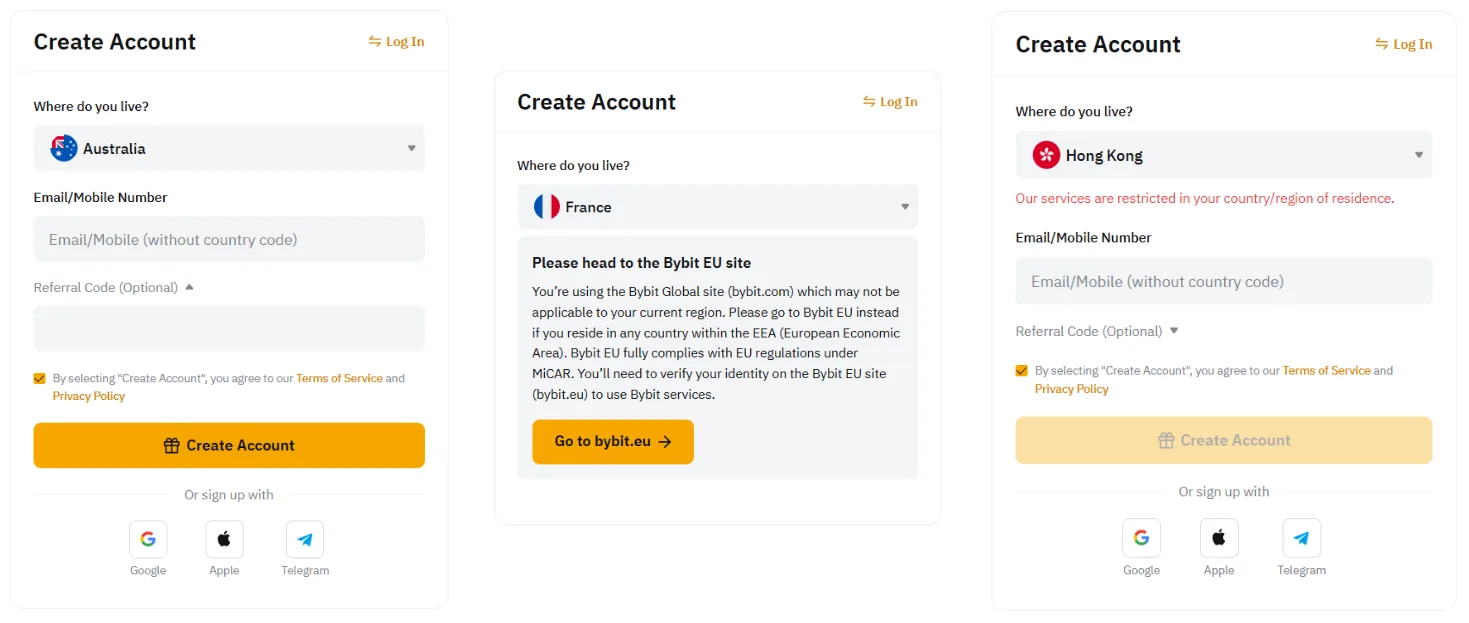
Choose your residence truthfully. It shapes the verification process, and Bybit notes that changing it after confirmation may require additional verification. Being able to open the sign-up page does not mean every Bybit product is available to you; stock tokens and stock contracts in particular can have their own regional limits.
Signing up on the Bybit website
- On the Bybit homepage, click Sign Up in the top right corner. Check that the address bar shows the official domain to avoid phishing sites.
- Select your country or region of residence.
- Enter an email address or mobile number. Bybit recommends email because withdrawals require both email and Google Authenticator verification, and suggests using an email provider you will be able to keep using. For a mobile number, choose the country code and leave out the leading zero.
- Alternatively, sign up with a Google, Apple or Telegram account. If you use Apple with Hide My Email, the account is tied to an Apple relay address, which is worth remembering for account recovery.
- If you have a referral or affiliate code, enter it before clicking Sign Up Now; it generally cannot be added afterwards.
- Complete the captcha and enter the verification code sent to your email or phone.
- Set your password. You then land on the account dashboard, where you can start identity verification.
Bybit notes that each email address and mobile number can be linked to only one account. If a code does not arrive, check spam folders and the address or number you entered, then resend.
Identity verification (KYC): what each level needs
Bybit divides individual verification into Standard, Advanced and Pro. According to Bybit, at least Standard verification is required for all products and services; higher levels mainly raise withdrawal limits.
| Level | What you submit | Notes |
|---|---|---|
| Standard | Proof of identity (passport, ID card or driver's licence) plus facial recognition, followed by an identity assessment | Required to use Bybit's products |
| Advanced | Proof of address such as a utility bill, bank statement or government-issued residence proof, dated within the last three months | Available after Standard |
| Pro | Enhanced due diligence: a questionnaire and proof of income | For higher limits |
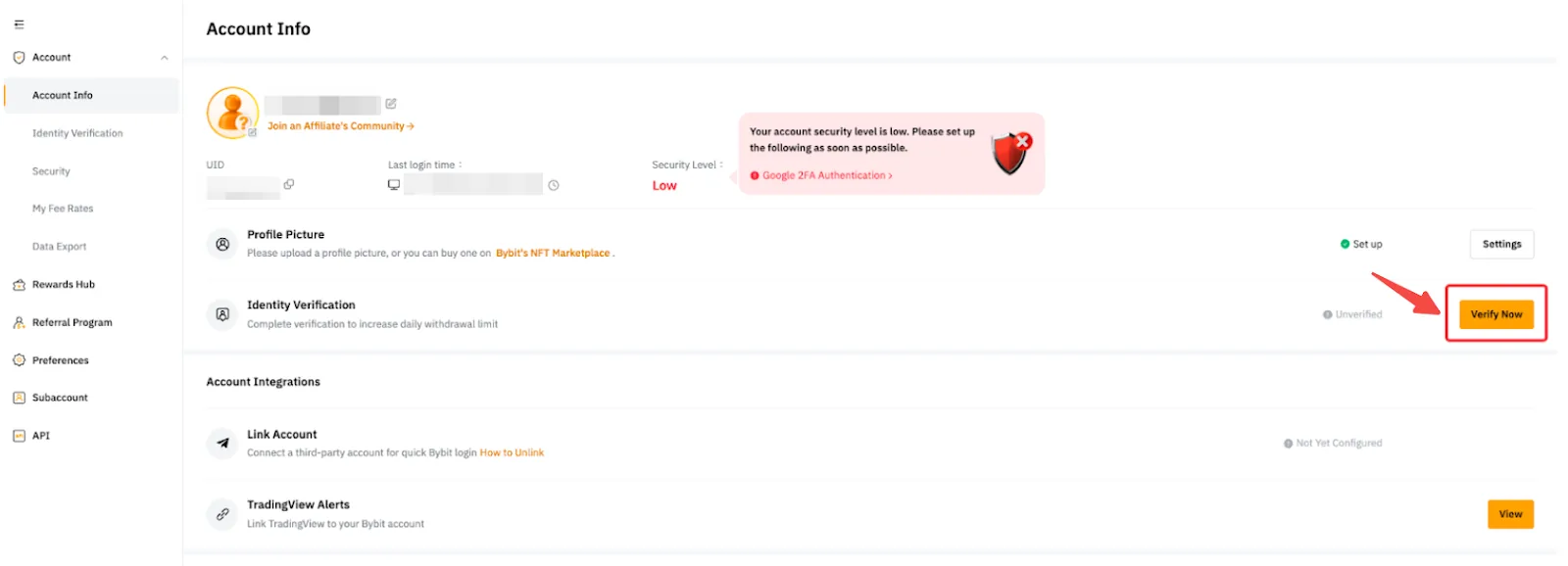
On the website, click the profile icon on the right of the navigation bar, open Account, and click Verify Now in the Identity Verification row of Account Info.
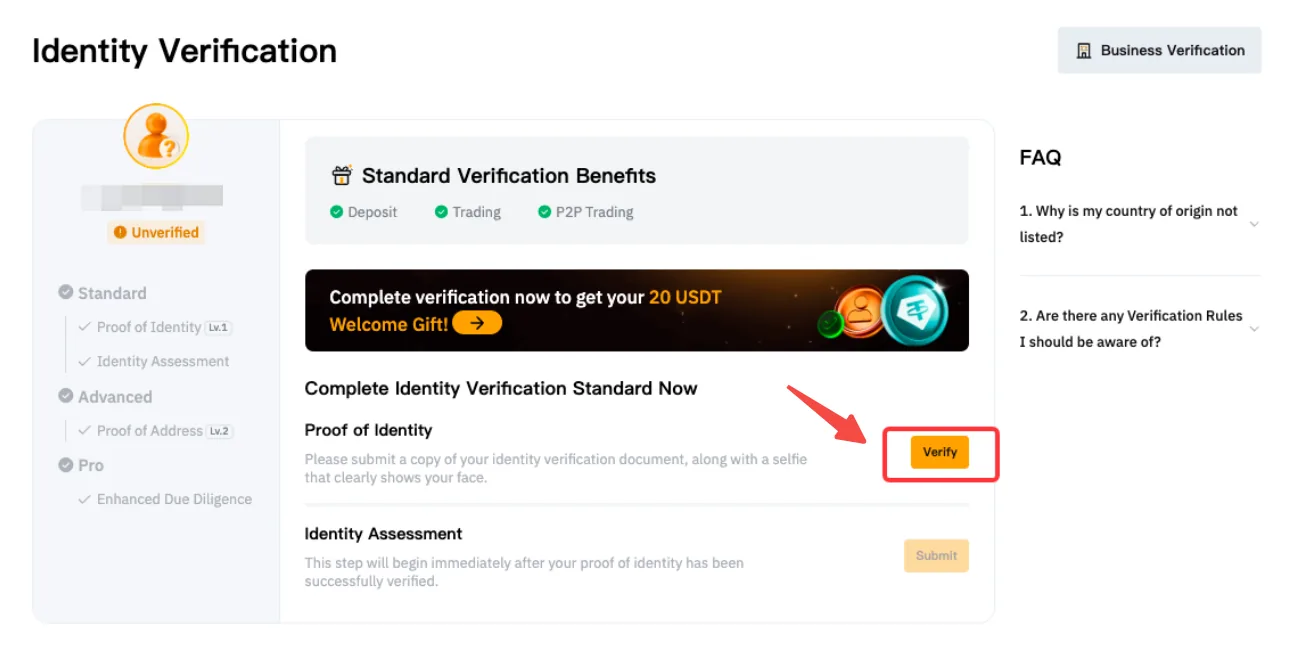
On the verification page, select your current residence, then click Verify under Proof of Identity: choose the issuing country and document type, photograph the document and complete facial recognition with your laptop camera, or scan the QR code to finish on your phone. The document photo must clearly show your full name and date of birth, and the document must not be altered.
Timing: Bybit's FAQ says verification usually takes about 15 minutes and can take up to 48 hours in complex cases. If you cannot reach the facial recognition step after several attempts, the document may not meet requirements or there may have been too many submissions in a short time; Bybit suggests trying again after 30 minutes and contacting support if it persists.
Security: two things to set up before withdrawing
Bybit requires both email verification and Google Authenticator for withdrawals, so after signing up:
- Link an email address you will keep using; if you registered with a phone number, add an email too.
- Turn on Google Authenticator in the security settings, back up the setup key offline, and make sure you can migrate it before changing phones.
- Never share codes or keys with anyone; genuine support staff will not ask for them.
Where to buy xStocks after opening an account
Bybit lists xStocks on its spot market, such as TSLAX/USDT and AAPLX/USDT, traded with USDT around the clock. Search the symbol on the spot trading page on the website or app.
Bybit's xStocks use a multiplier. Stock splits, reverse splits and dividends do not change the number of on-chain tokens, but they change how many shares each token represents. Bybit shows the current multiplier and its history on the trading page, lets you switch between the token price and the stock price, and lets you size an order by value, token quantity or stock quantity.
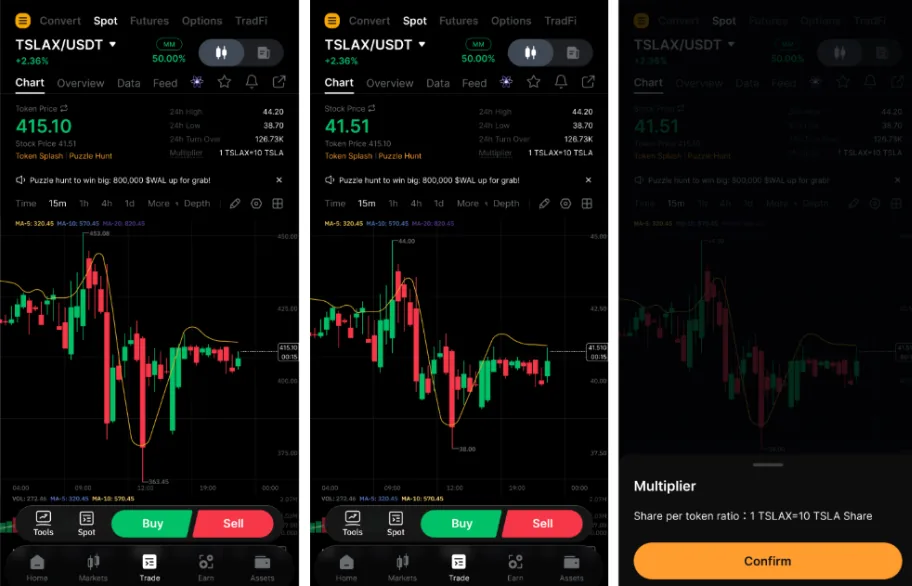
Our stock pages show "1 token ≈ N shares" for Bybit's xStocks and calculate the premium on that basis, so you can compare them directly with other venues and the same token on Solana. For how dividends change the share count, see how stock token dividends work.
Where Bybit's stock perpetuals are
Bybit groups stock and commodity perpetuals as TradFi perpetual contracts, denominated and settled in USDT. On the Futures trading page, open the symbol menu in the top left and go to Perpetual → USDT → Commodity or Stock.
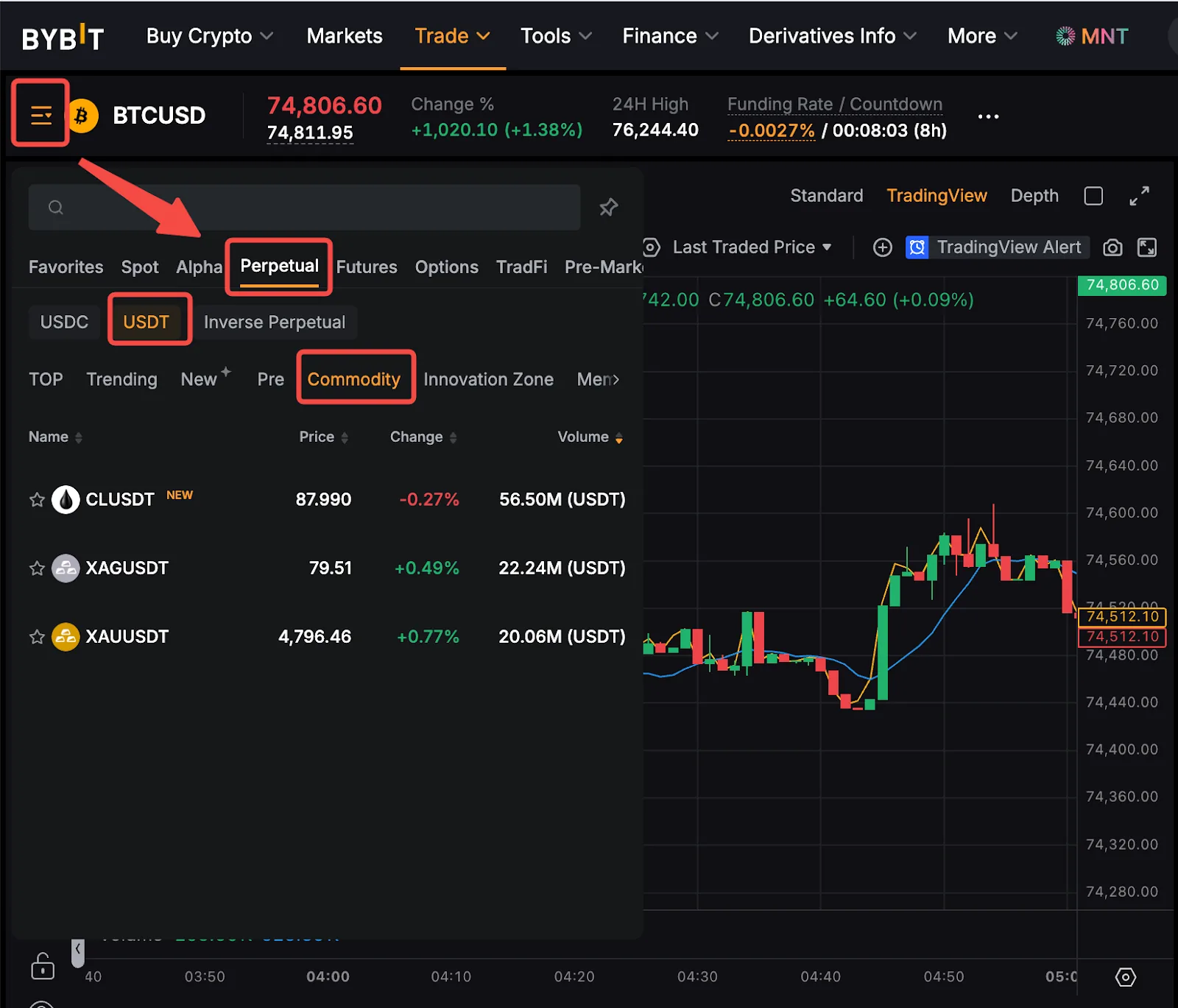
Key points from Bybit's description:
- TradFi perpetuals use the same margin, funding and liquidation mechanisms as standard USDT perpetuals, with some parameters such as the index calculation and mark price deviation limits adjusted for traditional markets.
- They are derivatives, do not represent ownership of the underlying and carry no shareholder rights such as voting.
- When the underlying has a corporate action such as a cash dividend, split or consolidation, Bybit adjusts the relevant contracts under its rules; this reflects the action's effect on the contract and does not mean you receive a dividend.
- TradFi perpetuals are unavailable in certain regions.
For funding and leverage risk, see stock perpetuals and funding rates.
Frequently asked questions
Do I need documents to sign up for Bybit?
Creating an account needs only an email or phone number, but using Bybit's products requires at least Standard verification, which involves uploading a document and facial recognition.
Can I add a referral code after signing up?
Bybit's flow asks for the referral or affiliate code before you click Sign Up Now; it generally cannot be added later.
My verification has been pending for a long time. What now?
It usually takes about 15 minutes and at most around 48 hours. If it takes longer or is rejected, follow the reason shown on the page and contact official support.
Official sources and review date
Based on Bybit's help-centre articles on registration (updated 2026-08-17), individual identity verification (updated 2026-07-06), xStocks trading (updated 2026-04-27) and TradFi perpetual contracts (updated 2026-09-22), reviewed on October 4, 2026. Screenshots are from Bybit's help centre. See the Bybit venue page for sign-up and regional terms. This guide explains procedures and is not investment advice.