How to Buy Stock Tokens on Solana: Wallet, Swap Steps and Avoiding Fakes
Step by step: swap USDC for stock tokens such as AAPLx and TSLAx with a Solana wallet, verify the official contract address to avoid copycats, and check price, liquidity and slippage.
Besides buying on an exchange, you can swap USDC for stock tokens directly on Solana and keep them in your own wallet. xStocks such as AAPLx, TSLAx, NVDAx and SPYx are the most actively traded stock tokens on Solana, and some Ondo tokens are deployed there too. Using a TSLAx swap on Jupiter as the example, this guide walks through the steps, how to check the price before you swap and, most importantly, how to avoid copycat tokens.
What you need
- A Solana wallet such as Phantom or Solflare. xStocks use Solana's Token-2022 standard, so use a recent wallet version that supports it.
- A little SOL for network fees. A swap usually costs very little, but you cannot send a transaction with a zero balance, so keep some in reserve.
- USDC on Solana to swap for stock tokens. You can withdraw it from an exchange; choose the Solana network when withdrawing, because assets sent on the wrong network may be unrecoverable.
- Eligibility under the issuer's terms: neither xStocks nor Ondo is offered to US persons or other restricted jurisdictions; see the FAQ below.
Step 1: get the official contract address
Anyone can create a token called "TSLAx" with the same logo on-chain, so never search by name. First get the contract address published by the issuer (on Solana it is called the mint address):
- Search for the stock on this site, for example the TSLA page;
- In "Official contract addresses", find the row with issuer xStocks and chain Solana, and click Copy.
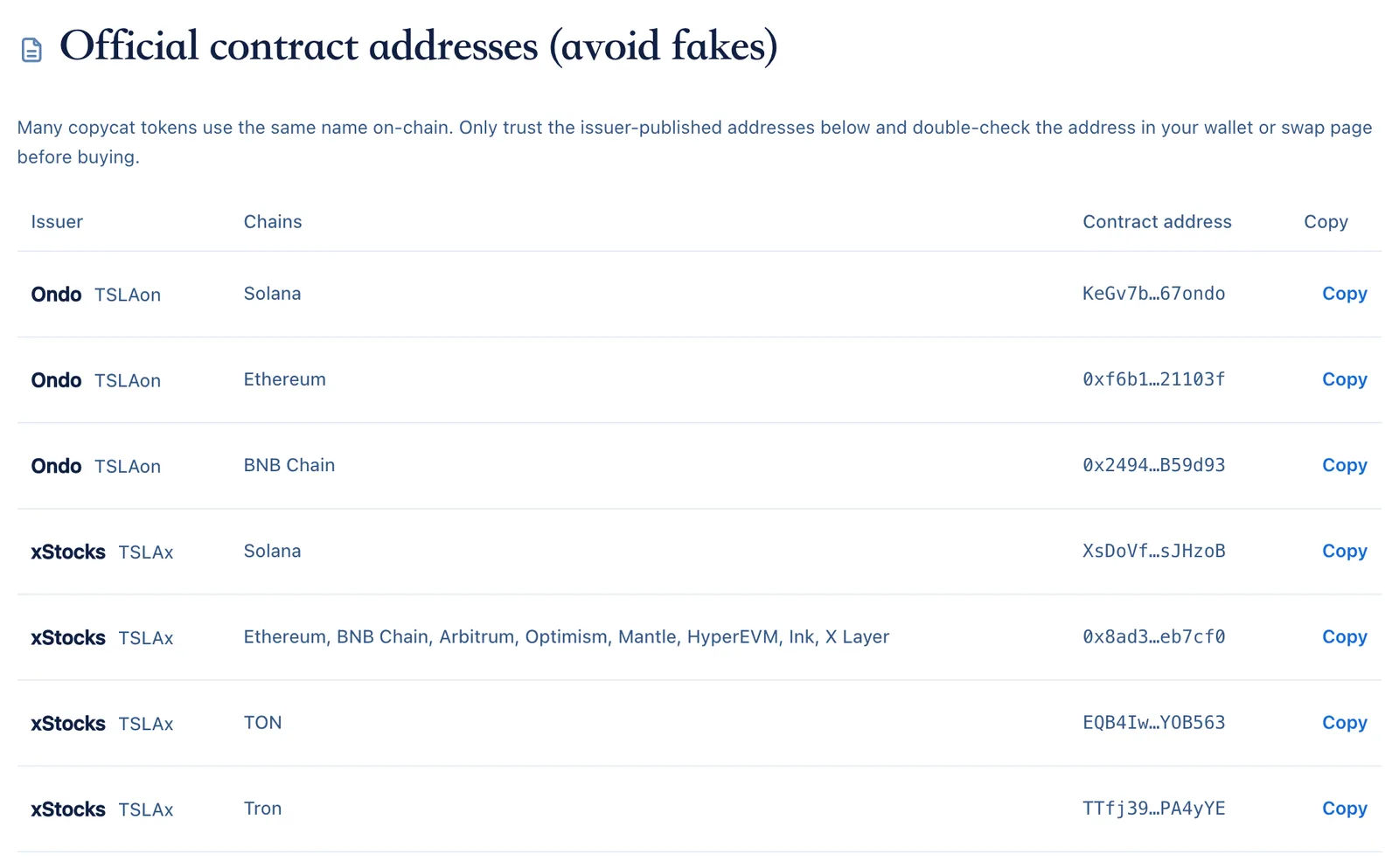
We list only addresses published by the issuers: xStocks from the issuer's public asset list and Ondo from its official channels, cross-checked. As a quick sanity check, the xStocks Solana addresses we list all start with Xs, and Ondo token addresses all end with ondo. Use this only as a hint; the full address must match.
Step 2: select the token by address in the swap tool
Open a Solana swap tool such as Jupiter and connect your wallet. Choose USDC under "Sell", then under "Buy" click "Paste CA" or the token selector and paste the address you copied rather than typing the name. The Trade button on the Solana row of our stock page also opens the swap page for that exact address.
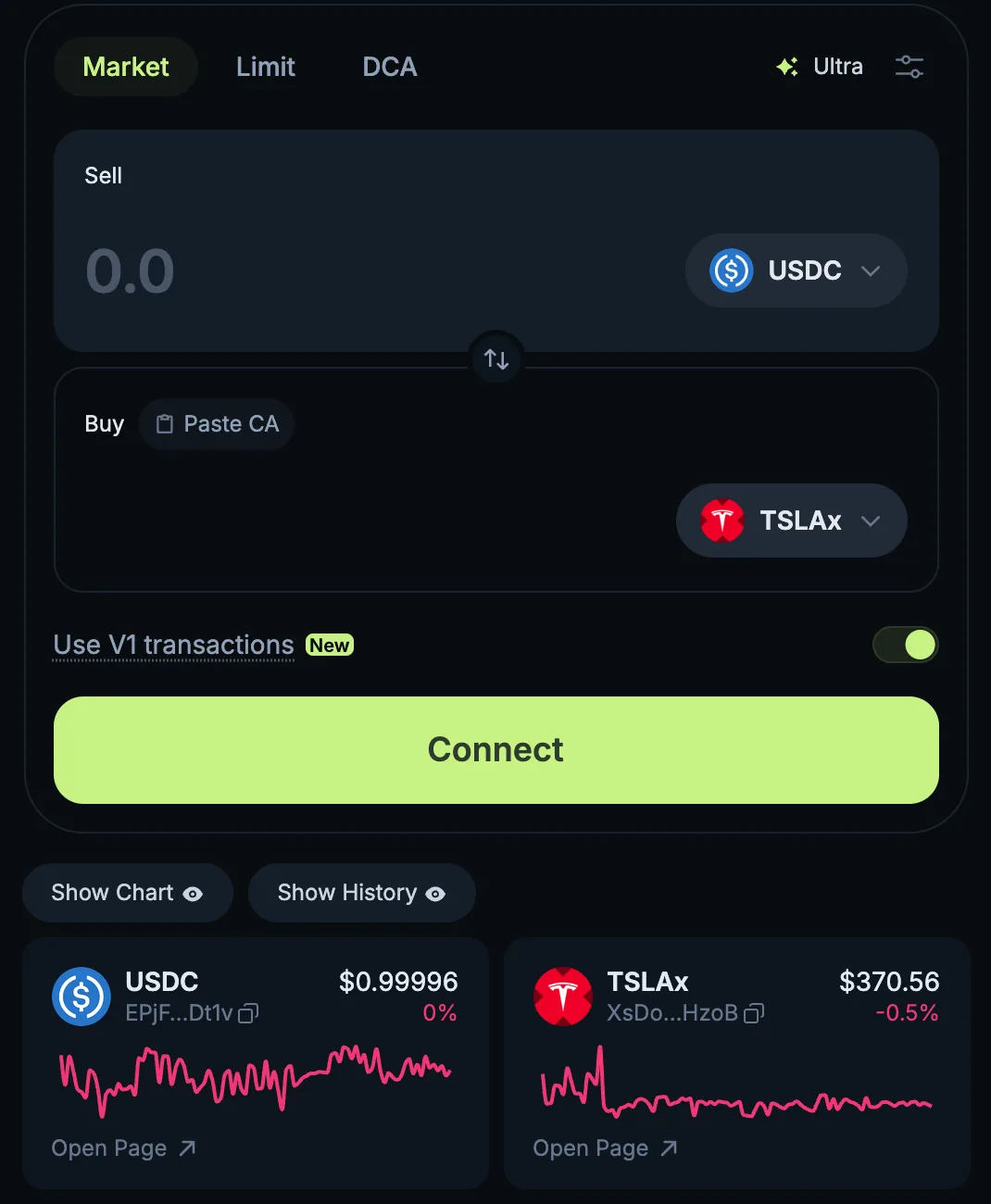
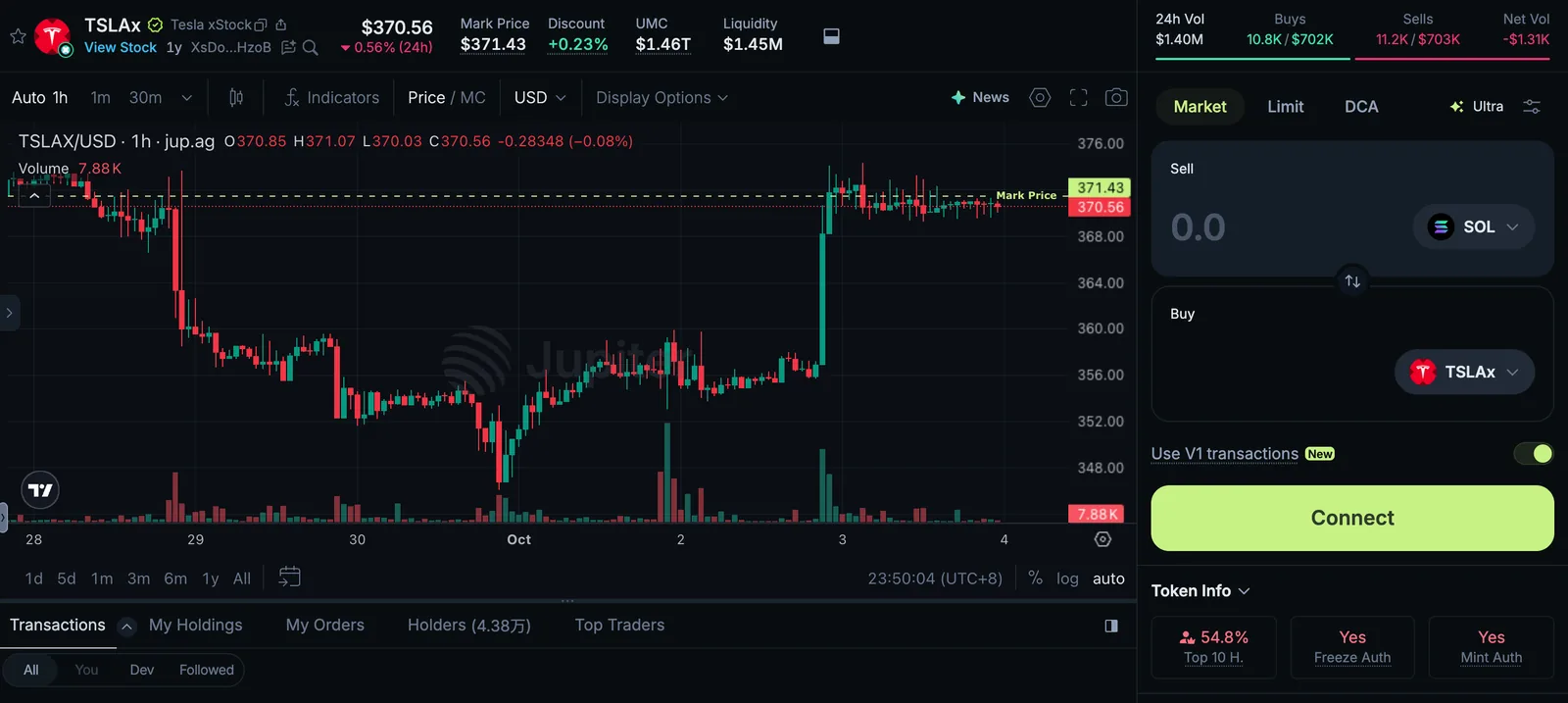
Once selected, compare the abbreviated address on screen with the full address you copied, both the start and the end. You can also open the token's detail page to check that its full name is "Tesla xStock" and that liquidity and volume look normal: the genuine token typically has liquidity in the millions of dollars and continuous trading, while fakes tend to sit in shallow pools.
Step 3: check the price and slippage before swapping
- Compare with the share price: check the token's premium on our stock page. A positive premium means it is more expensive than the stock. While US markets are closed (overnight and at weekends), the share price is not live and the premium is only indicative.
- Check on-chain liquidity: our stock pages list it. The lower the liquidity, the more a large purchase moves the price.
- Read the price impact in the quote: after you enter an amount, the swap tool shows the expected tokens and the price impact. If the impact is noticeable, reduce the amount or split it into several swaps.
- Set a sensible slippage tolerance: tools usually set it automatically. Too high and you may get a much worse price; too low and the swap may fail and need resubmitting.
Step 4: confirm and check your wallet
When you swap, your wallet shows a confirmation. Check the USDC amount, the tokens you receive and the network fee, then confirm; it usually completes within seconds. The token then appears in your wallet's asset list; if it does not, add it manually using the contract address. You can look up the transaction in your wallet or in a block explorer using its signature.
What on-chain buying costs
Costs on-chain are made up differently from an exchange, so know them before you start:
- Network fees: each transaction needs a little SOL. Fees are usually tiny, can rise when the network is busy, and a small priority fee is sometimes added for faster confirmation.
- Routing fees and spreads: aggregators search several liquidity pools for the best route, and quotes already include pool fees; quotes differ by time and amount.
- Price impact and slippage: the larger the order relative to the pool, the worse the price. This is the main hidden cost of large on-chain purchases.
- Deposit and withdrawal costs: moving USDC from an exchange to your wallet, and back after selling, can incur withdrawal fees.
For small amounts, total costs on-chain and on an exchange are similar. For larger amounts, compare the on-chain and exchange tokens' premium and volume on our stock page first.
Selling and moving tokens
To sell, reverse the process: swap TSLAx back to USDC in the swap tool, again watching price impact and slippage. If you want to sell on an exchange, first confirm it supports xStocks deposits on Solana and double-check the deposit address and network; deposits to unsupported venues may never arrive.
Token count versus shares
xStocks converts dividends into more shares per token, and on Solana this shows up in the displayed token balance. Your balance may therefore increase slightly over time, which is normal; see how stock token dividends work.
Frequently asked questions
Why does one name return so many tokens?
Launching a token on-chain is cheap, and copycats reuse names, logos and even descriptions. The only reliable approach is to trust the address published by the issuer.
Are on-chain tokens the same as those on exchanges?
xStocks on exchanges and on-chain belong to the same series, but exchange balances are held by the exchange, while tokens you buy on-chain sit in your wallet. If you lose your private key or seed phrase, they cannot be recovered.
Are there regional restrictions on-chain?
On-chain swaps do not need an account, but token issuers restrict holders in certain countries and regions; xStocks and Ondo are explicitly not offered to US persons. Check the issuer's terms and local rules before buying.
Jupiter shows mint and freeze authority. Is that a problem?
No. Stock tokens must be minted and burned as shares are created and redeemed, and issuers must meet compliance requirements, so they keep these authorities. Authenticity is decided by the contract address, not by these flags.
For background, read what tokenized stocks are and xStocks vs Ondo vs bStocks. This guide explains the steps and is not investment advice.